Run executables on your phone with adb (using model.bin)
In Build sherpa-onnx for Qualcomm NPU, we have described how to generate
executable files. This section describes how to run them with QNN models (model.bin) on your
phone with adb.
Hint
model.bin is OS-independent, but QNN-SDK-dependent and SoC-dependent.
OS-independent: A
model.bincan run on both Android/arm64 and Linux/arm64.QNN-SDK-dependent: Once built,
model.bindepends on the version of the QNN SDK used during its creation.SoC-dependent: A
model.binbuilt for SM8850 cannot be used on SA8259, and vice versa.Trade-off: The first-run initialization is extremely fast because the context is pre-generated.
Alternative: If you need SoC-independence or QNN-SDK-independence, use
libmodel.so. For guidance, see Run executables on your phone with adb (using libmodel.so).
Feature |
libmodel.so |
model.bin |
|---|---|---|
OS Dependency |
OS-dependent: cannot run across
different OS/arch
(e.g., Android/arm64
vs Linux/arm64)
|
OS-independent: can run on
multiple OS/arch
(e.g., Android/arm64
and Linux/arm64)
|
SoC Dependency |
SoC-independent: can run
on multiple Qualcomm chips
(e.g., SM8850, SA8259, QCS9100)
|
SoC-dependent: built for
a specific chip;
cannot run on a different SoC
|
QNN-SDK Dependency |
QNN-SDK-independent: works
with any QNN SDK version
|
QNN-SDK-dependent: depends
on the QNN SDK version
used to build it
|
First-Run Initialization |
Slow: context must be
generated at runtime
|
Fast: context is
pre-generated
|
Recommended Use |
When SoC-independence or
SDK-independence is needed
|
When fastest startup is required |
Note: Choose libmodel.so if you need flexibility across SoCs or
QNN SDK versions. Use model.bin if you want the fastest possible
first-run initialization on a specific SoC.
Download a QNN model
You can find available QNN models at
Since QNN does not support dynamic input shapes, we limit the maximum duration the model can handle. For example, if the limit is 10 seconds, any input shorter than 10 seconds will be padded to 10 seconds, and inputs longer than 10 seconds will be truncated to that length.
The model name indicates the maximum duration the model can handle.
Caution
I am using a Xiaomi 17 Pro for testing, so I selected a model with SM8850 in its name.
Make sure to select a model that matches your own device.
Suppose you are testing on a Samsung Galaxy S23 Ultra, which uses the SM8550 SoC; In this case, you should select a model with SM8550 in its name instead of SM8850.
We use sherpa-onnx-qnn-SM8850-binary-10-seconds-sense-voice-zh-en-ja-ko-yue-2024-07-17-int8.tar.bz2
as an example below:
wget https://github.com/k2-fsa/sherpa-onnx/releases/download/asr-models-qnn-binary/sherpa-onnx-qnn-SM8850-binary-10-seconds-sense-voice-zh-en-ja-ko-yue-2024-07-17-int8.tar.bz2
tar xvf sherpa-onnx-qnn-SM8850-binary-10-seconds-sense-voice-zh-en-ja-ko-yue-2024-07-17-int8.tar.bz2
rm sherpa-onnx-qnn-SM8850-binary-10-seconds-sense-voice-zh-en-ja-ko-yue-2024-07-17-int8.tar.bz2
You should see the following files:
ls -lh sherpa-onnx-qnn-SM8850-binary-10-seconds-sense-voice-zh-en-ja-ko-yue-2024-07-17-int8/
total 526984
-rw-r--r--@ 1 fangjun  staff    23B  9 Dec 16:40 info.txt
-rw-r--r--@ 1 fangjun  staff    71B  9 Dec 16:40 LICENSE
-rw-r--r--@ 1 fangjun  staff   242M  9 Dec 16:40 model.bin
-rw-r--r--@ 1 fangjun  staff   104B  9 Dec 16:40 README.md
drwxr-xr-x@ 7 fangjun  staff   224B  9 Dec 16:40 test_wavs
-rw-r--r--@ 1 fangjun  staff   308K  9 Dec 16:40 tokens.txt
Copy files to your phone
We assume you put files in the directory /data/local/tmp/binary on your phone.
# Run on your computer

adb shell mkdir /data/local/tmp/binary
Copy model files
# Run on your computer

adb push ./sherpa-onnx-qnn-SM8850-binary-10-seconds-sense-voice-zh-en-ja-ko-yue-2024-07-17-int8 /data/local/tmp/binary/
Copy sherpa-onnx executable files
# Run on your computer

adb push ./build-android-arm64-v8a/install/bin/sherpa-onnx-offline /data/local/tmp/binary/
Copy sherpa-onnx library files
# Run on your computer

adb push ./build-android-arm64-v8a/install/lib/libonnxruntime.so /data/local/tmp/binary/
Hint
You don’t need to copy libsherpa-onnx-jni.so in this case.
Copy QNN library files
Before you continue, we assume you have followed Download QNN SDK
to download QNN SDK and set up the environment variable QNN_SDK_ROOT.
You should run:
echo $QNN_SDK_ROOT
to check that it points to the QNN SDK directory.
Warning
We use QNN SDK v2.40.0.251030 to generate model.bin.
If you change the QNN SDK version, please re-generate the model.bin by yourself.
# Run on your computer

adb push $QNN_SDK_ROOT/lib/aarch64-android/libQnnHtp.so /data/local/tmp/binary/
adb push $QNN_SDK_ROOT/lib/aarch64-android/libQnnHtpPrepare.so /data/local/tmp/binary/
adb push $QNN_SDK_ROOT/lib/aarch64-android/libQnnSystem.so /data/local/tmp/binary/

# Since my Xiami 17 Pro is SM8850, which corresponds to Htp Arch 81, so I choose
# libQnnHtpV81Stub.so and libQnnHtpV81Skel.so
#
# Please udpate it accordingly to match your device
#
adb push $QNN_SDK_ROOT/lib/aarch64-android/libQnnHtpV81Stub.so /data/local/tmp/binary/

adb push $QNN_SDK_ROOT/lib/hexagon-v81/unsigned/libQnnHtpV81Skel.so /data/local/tmp/binary/
Run it !
adb shell
The following commands are run on your phone.
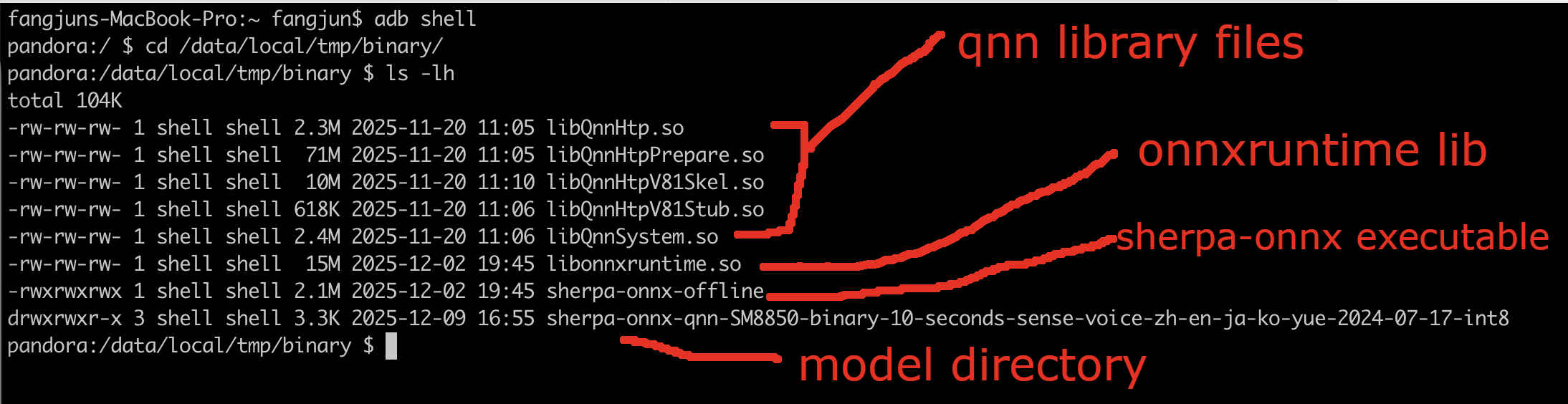
Check files
First, check that you have followed above commands to copy files:

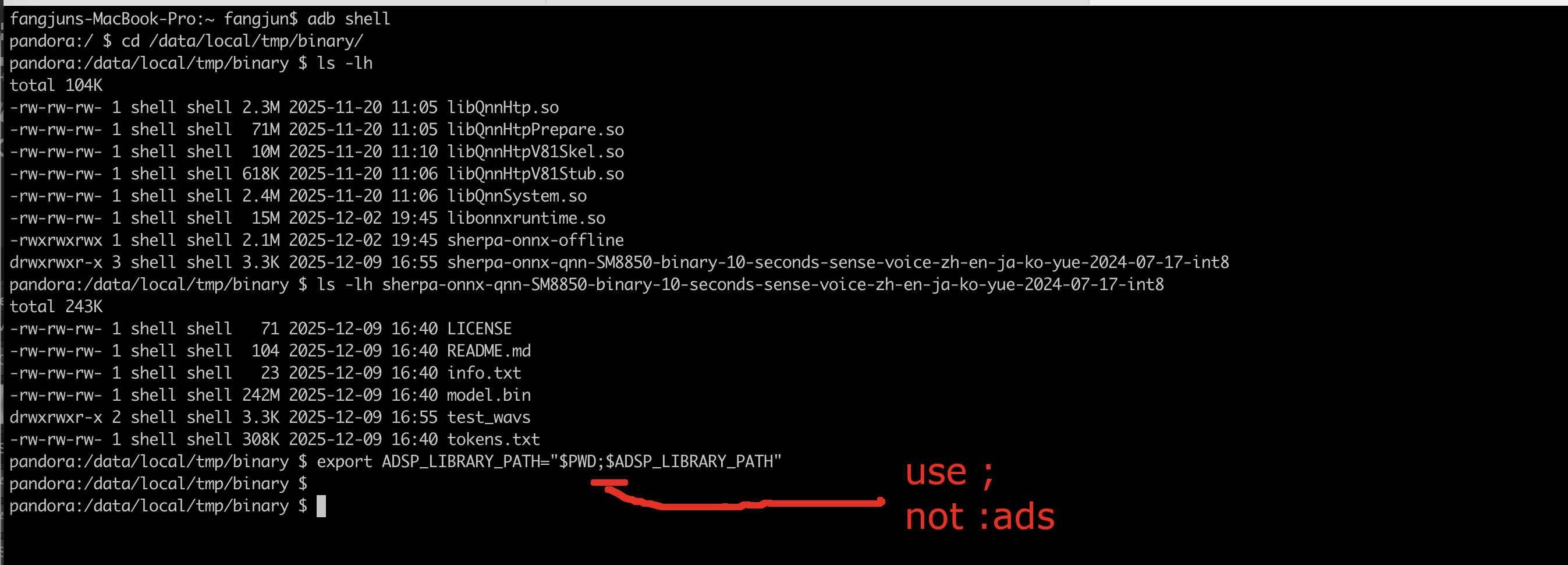
Set environment variable ADSP_LIBRARY_PATH
export ADSP_LIBRARY_PATH="$PWD;$ADSP_LIBRARY_PATH"
where $PWD is /data/local/tmp/binary in this case.
Caution
Please use ;, not :.
It is an error to use export ADSP_LIBRARY_PATH="$PWD:$ADSP_LIBRARY_PATH"
It is an error to use export ADSP_LIBRARY_PATH="$PWD:$ADSP_LIBRARY_PATH"
It is an error to use export ADSP_LIBRARY_PATH="$PWD:$ADSP_LIBRARY_PATH"
Run sherpa-onnx-offline
Caution
You would be sad if you did not set the environment variable ADSP_LIBRARY_PATH.
./sherpa-onnx-offline \
  --provider=qnn \
  --tokens=./sherpa-onnx-qnn-SM8850-binary-10-seconds-sense-voice-zh-en-ja-ko-yue-2024-07-17-int8/tokens.txt \
  --sense-voice.qnn-backend-lib=./libQnnHtp.so \
  --sense-voice.qnn-system-lib=./libQnnSystem.so \
  --sense-voice.qnn-context-binary=./sherpa-onnx-qnn-SM8850-binary-10-seconds-sense-voice-zh-en-ja-ko-yue-2024-07-17-int8/model.bin \
  ./sherpa-onnx-qnn-SM8850-binary-10-seconds-sense-voice-zh-en-ja-ko-yue-2024-07-17-int8/test_wavs/zh.wav
or write it in a single line:
./sherpa-onnx-offline --provider=qnn --tokens=./sherpa-onnx-qnn-SM8850-binary-10-seconds-sense-voice-zh-en-ja-ko-yue-2024-07-17-int8/tokens.txt --sense-voice.qnn-backend-lib=./libQnnHtp.so --sense-voice.qnn-system-lib=./libQnnSystem.so --sense-voice.qnn-context-binary=./sherpa-onnx-qnn-SM8850-binary-10-seconds-sense-voice-zh-en-ja-ko-yue-2024-07-17-int8/model.bin ./sherpa-onnx-qnn-SM8850-binary-10-seconds-sense-voice-zh-en-ja-ko-yue-2024-07-17-int8/test_wavs/zh.wav
You can also find the log below:
Click ▶ to see the log .
/Users/fangjun/open-source/sherpa-onnx/sherpa-onnx/csrc/parse-options.cc:Read:373 ./sherpa-onnx-offline --provider=qnn --tokens=./sherpa-onnx-qnn-SM8850-binary-10-seconds-sense-voice-zh-en-ja-ko-yue-2024-07-17-int8/tokens.txt --sense-voice.qnn-backend-lib=./libQnnHtp.so --sense-voice.qnn-system-lib=./libQnnSystem.so --sense-voice.qnn-context-binary=./sherpa-onnx-qnn-SM8850-binary-10-seconds-sense-voice-zh-en-ja-ko-yue-2024-07-17-int8/model.bin ./sherpa-onnx-qnn-SM8850-binary-10-seconds-sense-voice-zh-en-ja-ko-yue-2024-07-17-int8/test_wavs/zh.wav

OfflineRecognizerConfig(feat_config=FeatureExtractorConfig(sampling_rate=16000, feature_dim=80, low_freq=20, high_freq=-400, dither=0, normalize_samples=True, snip_edges=False), model_config=OfflineModelConfig(transducer=OfflineTransducerModelConfig(encoder_filename="", decoder_filename="", joiner_filename=""), paraformer=OfflineParaformerModelConfig(model=""), nemo_ctc=OfflineNemoEncDecCtcModelConfig(model=""), whisper=OfflineWhisperModelConfig(encoder="", decoder="", language="", task="transcribe", tail_paddings=-1), fire_red_asr=OfflineFireRedAsrModelConfig(encoder="", decoder=""), tdnn=OfflineTdnnModelConfig(model=""), zipformer_ctc=OfflineZipformerCtcModelConfig(model=""), wenet_ctc=OfflineWenetCtcModelConfig(model=""), sense_voice=OfflineSenseVoiceModelConfig(model="", qnn_config=QnnConfig(backend_lib="./libQnnHtp.so", context_binary="./sherpa-onnx-qnn-SM8850-binary-10-seconds-sense-voice-zh-en-ja-ko-yue-2024-07-17-int8/model.bin", system_lib="./libQnnSystem.so"), language="auto", use_itn=False), moonshine=OfflineMoonshineModelConfig(preprocessor="", encoder="", uncached_decoder="", cached_decoder=""), dolphin=OfflineDolphinModelConfig(model=""), canary=OfflineCanaryModelConfig(encoder="", decoder="", src_lang="", tgt_lang="", use_pnc=True), omnilingual=OfflineOmnilingualAsrCtcModelConfig(model=""), telespeech_ctc="", tokens="./sherpa-onnx-qnn-SM8850-binary-10-seconds-sense-voice-zh-en-ja-ko-yue-2024-07-17-int8/tokens.txt", num_threads=2, debug=False, provider="qnn", model_type="", modeling_unit="cjkchar", bpe_vocab=""), lm_config=OfflineLMConfig(model="", scale=0.5, lodr_scale=0.01, lodr_fst="", lodr_backoff_id=-1), ctc_fst_decoder_config=OfflineCtcFstDecoderConfig(graph="", max_active=3000), decoding_method="greedy_search", max_active_paths=4, hotwords_file="", hotwords_score=1.5, blank_penalty=0, rule_fsts="", rule_fars="", hr=HomophoneReplacerConfig(lexicon="", rule_fsts=""))
Creating recognizer ...
/Users/fangjun/open-source/sherpa-onnx/sherpa-onnx/csrc/qnn/utils.cc:CopyGraphsInfo:465 version: 3
recognizer created in 1.214 s
Started
Done!

./sherpa-onnx-qnn-SM8850-binary-10-seconds-sense-voice-zh-en-ja-ko-yue-2024-07-17-int8/test_wavs/zh.wav
{"lang": "<|zh|>", "emotion": "<|NEUTRAL|>", "event": "<|Speech|>", "text": "开饭时间早上九点至下午五点", "timestamps": [0.72, 0.96, 1.26, 1.44, 1.92, 2.10, 2.58, 2.82, 3.30, 3.90, 4.20, 4.56, 4.74], "durations": [], "tokens":["开", "饭", "时", "间", "早", "上", "九", "点", "至", "下", "午", "五", "点"], "ys_log_probs": [], "words": []}
----
num threads: 2
decoding method: greedy_search
Elapsed seconds: 0.290 s
Real time factor (RTF): 0.290 / 5.592 = 0.052
     0.0ms [WARN   ] QnnDsp <W> Initializing HtpProvider
     0.0ms [WARN   ] QnnDsp <W> m_CFBCallbackInfoObj is not initialized, return emptyList
     0.0ms [WARN   ] QnnDsp <W> m_CFBCallbackInfoObj is not initialized, return emptyList
Please ignore the num_threads information in the log. It is not used by qnn.
Hint
The model actually processed 10 seconds of audio, so the RTF is even smaller.
Congratulations
Congratulations! You have successfully launched sherpa-onnx on your phone, leveraging Qualcomm NPU via QNN with the HTP backend.